Scripting Tab
This tab can be used to extend the functionality of the base program by applying additional Python scripts. Scripts can be used to modify, filter, and create incoming and outgoing messages. Scripting is done on Python version 2.7.
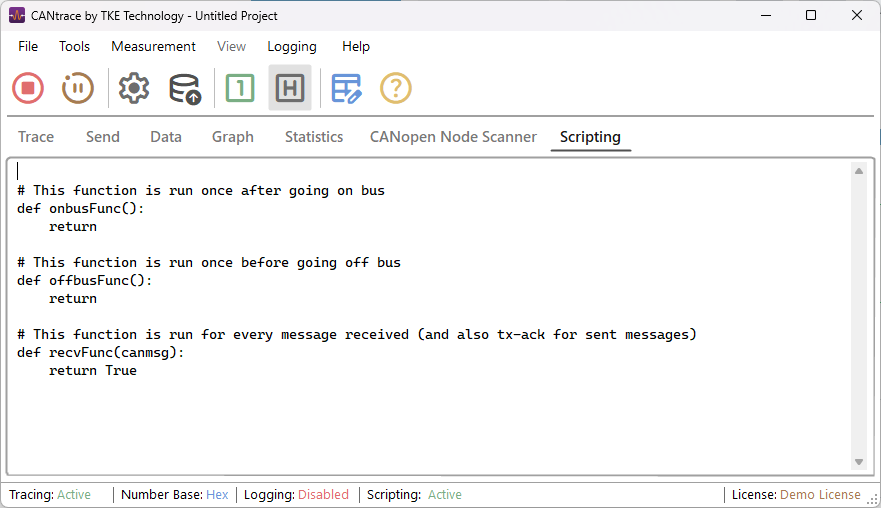
The Scripting tab consists of a text field used to write scripts and a Python status bar displaying script status and errors ("Active").
Writing Scripts
Scripting in the CANtrace Scripting tab is done in Python programming language. As expected, the Scripting tab follows standard Python syntax and semantics with scripts.
Some notable things are that the scripting window doesn’t accept tabs for indentation; indentation of one step is made with four spaces. Also some data types (for example canmsg.Data) can differ from standard Python data types.
Script deployment and errors
Successful deployment of a script displays a “Active” status on the status bar found on the bottom of CANtrace window. If deployment of a script is unsuccessful a relevant error message is displayed instead.
While running a script, if Python runs into an error, a descriptive error explanation will be displayed at the Python status bar. After running into an error, the functionality of the script is stopped. If the script contains multiple errors, the status bar will only display the first error found. Displayed error messages show the offending line number and error message type for easier script debugging.
Callback functions and Class CanMsg
Python scripting callback functions
| Name | Definition | Uses |
|---|---|---|
| onbusFunc() | This function is called by CANtrace when going on bus, after all CAN hardware is initialized. You can send CAN messages in this function, but don’t let it take too long as CANtrace won’t complete going on bus until this function is finished. | - Open files - Initialize data - Send a CAN messages |
| offbusFunc() | This function is called before going off bus. You can still send CAN messages in this function. | - Close files - Send a CAN messages - Write a report to disk |
| recvFunc(canmsg) | This function is called for every CAN message sent or received. It is called before the message is sent to the GUI components and logger in CANtrace. Parameter canmsg is class type of CanMsg that contains the CAN message information. Returning False in this function will discard the message, so it will not show up in the trace, data and other tabs and it will not be logged to disk if CANtrace has logging configured. Returning True will cause CANtrace to process the message normally. This function needs to execute very fast as it’s run for every CAN message received, which can be thousands per second. You can send CAN messages from this function. | - Modify incoming messages - Blacklist unwanted messages - Whitelist wanted messages - Filter incoming messages - Send a CAN messages |
Class CanMsg members
| Name | Definition | Type |
|---|---|---|
| Id | CAN message identifier | int |
| Channel | CAN channel where the message is received from | int |
| Data | Array of bytes with CAN data | Array[Byte] |
| TimeStamp | Message timestamp in seconds | float |
| Dlc | Length of CAN message | Int16 |
| IsTxAck | True for Tx, False for Rx | bool |
| IsExtendedId | True for extended CAN messages | bool |
| IsRtr | True for RTR messages | bool |
| IsErrorFrame | True for error frames | bool |
Language features
The software uses the IronPython library to execute Python 2.7 scripts.
The following features are supported:
- Core language
- Built-in functions
- Built-in constants
- Built-in types
- Built-in exceptions
- Modules with official support: time, math, sys, os details
- Also includes most IronPython modules, but with no official support. The list is provided in the Python Modules section.
CANtrace API (ctapi)
API class for calling functions in CANtrace has been setup for scripting purposes. The API class ctapi currently supports following methods.
ctapi methods
| Method | Definition | Parameters explained |
|---|---|---|
| Send(channel, canmsg) | Sends a CAN message to desired channel | channel: Specifies to which channel CAN message is sent to (int) canmsg: CAN message (CanMsg) |
Example Scripts
This chapter displays the default configuration for scripts. Detailed and descriptive example projects can be found at %PUBLIC%\CANtrace\Examples.
Example projects
| Name | Definition |
|---|---|
| Python Blacklist.xml | Example of blocking messages / signals with specific IDs |
| Python Default Configuration.xml | Shows default configuration to start scripts from |
| Python FIR Filter.xml | Example of how an incoming message can be FIR filtered |
| Python Log To File.xml | Example showing how logging to file can be done in different formats. This example shows Peak format |
| Python Toggle Bit in Send Message.xml | How to Dynamically Modify Bits in Outgoing CAN Messages |
| Python Whitelist.xml | Example of only letting through signals with specific Id |
Default configuration:
# This function is run once after going on bus
def onbusFunc():
    return

# This function is run once before going off bus
def offbusFunc():
    return

# This function is run for every message received (and also tx-ack for sent messages)
def recvFunc(canmsg):
    return True
Python Modules
List of all available modules:
| __builtin__ | commands | mailbox | SimpleXMLRPCServer | __future__ |
| compileall | mailcap | site | _abcoll | ConfigParser |
| markupbase | smtpd | _ast | contextlib | marshal |
| smtplib | _bisect | Cookie | math | sndhdr |
| _codecs | cookielib | md5 | socket | _collections |
| copy | mhlib | SocketServer | _csv | copy_reg |
| mimetools | sqlite3 | _ctypes | cPickle | mimetypes |
| sre_constants | _ctypes_test | cStringIO | MimeWriter | sre_parse |
| _functools | csv | mimify | ssl | _heapq |
| ctypes | mmap | stat | _io | datetime |
| modulefinder | statvfs | _locale | decimal | msvcrt |
| string | _LWPCookieJar | difflib | multifile | StringIO |
| _md5 | dircache | multiprocessing | stringold | _MozillaCookieJar |
| dis | mutex | stringprep | _osx_support | distutils |
| netrc | struct | _pyio | doctest | new |
| subprocess | _random | DocXMLRPCServer | nntplib | sunau |
| _sha | dumbdbm | nt | sunaudio | _sha256 |
| dummy_thread | ntpath | symbol | _sha512 | dummy_threading |
| nturl2path | sys | _socket | numbers | |
| sysconfig | _sre | encodings | opcode | tabnanny |
| _ssl | errno | operator | tarfile | _strptime |
| exceptions | optparse | telnetlib | _struct | filecmp |
| os | tempfile | _subprocess | fileinput | os2emxpath |
| textwrap | _threading_local | fnmatch | pdb | this |
| _warnings | formatter | pickle | thread | _weakref |
| fpformat | pickletools | threading | _weakrefset | fractions |
| pipes | time | _winreg | ftplib | pkgutil |
| timeit | abc | functools | platform | toaiff |
| aifc | future_builtins | plistlib | token | antigravity |
| gc | popen2 | tokenize | anydbm | genericpath |
| poplib | trace | argparse | getopt | posixfile |
| traceback | array | getpass | posixpath | types |
| ast | gettext | pprint | unicodedata | asynchat |
| glob | profile | unittest | asyncore | gzip |
| pstats | urllib | atexit | hashlib | py_compile |
| urllib2 | audiodev | heapq | pyclbr | urlparse |
| base64 | hmac | pydoc | user | BaseHTTPServer |
| htmlentitydefs | pydoc_data | UserDict | Bastion | htmllib |
| pyexpat | UserList | bdb | HTMLParser | Queue |
| UserString | binascii | httplib | quopri | uu |
| binhex | ihooks | random | uuid | bisect |
| imaplib | re | warnings | bz2 | imghdr |
| repr | wave | calendar | imp | rexec |
| weakref | cgi | importlib | rfc822 | webbrowser |
| CGIHTTPServer | imputil | robotparser | whichdb | cgitb |
| inspect | runpy | winsound | chunk | io |
| sched | wsgiref | clr | itertools | select |
| xdrlib | clrtype | json | sets | xml |
| cmath | keyword | sgmllib | xmllib | cmd |
| lib2to3 | sha | xmlrpclib | code | linecache |
| shelve | xxsubtype | codecs | locale | shlex |
| zipfile | codeop | logging | shutil | zipimport |
| collections | macpath | signal | zlib | colorsys |
| macurl2path | SimpleHTTPServer |
Officially supported Python modules
Currently the time, math, sys and os Python modules are officially supported.
Within these modules, the following functions or parameters were found not to work fully in accordance with the official Python documentation:
- os.umask() - returns 0 and doesn’t change the file access permissions.
- Functions that handle symbolic links:
- os.stat() - works properly but does not follow symbolic links.
- os.path.islink() - returns False instead of True when called on a symbolic link.
- os.path.realpath() - does not return the real path of a symbolic link.
- os.path.exists() - returns True instead of False when called on a broken symbolic link.
- os.stat_float_times() - calling this function causes an AttributeError as though the function is not part of the os module.
- os.lseek(fd, position, os.SEEK_CUR) - when called with the os.SEEK_CUR parameter, the cursor is moved to the end of the file, as though os.SEEK_END was used.
- Functions that start a new program that replaces the current process cause an error when called:
- os.execl()
- os.execle()
- os.execlp()
- os.execlpe()
- os.execv()
- os.execve()
- os.execvp()
- os.execvpe()