Log Settings
Log Settings is used for setting up your logging behavior. CANtrace supports logging in Vector ASCII and Vector Binary Log Format (BLF) file formats. Other file formats are not supported.
Access Log Settings from the menu bar: Logging > Logging Settings...
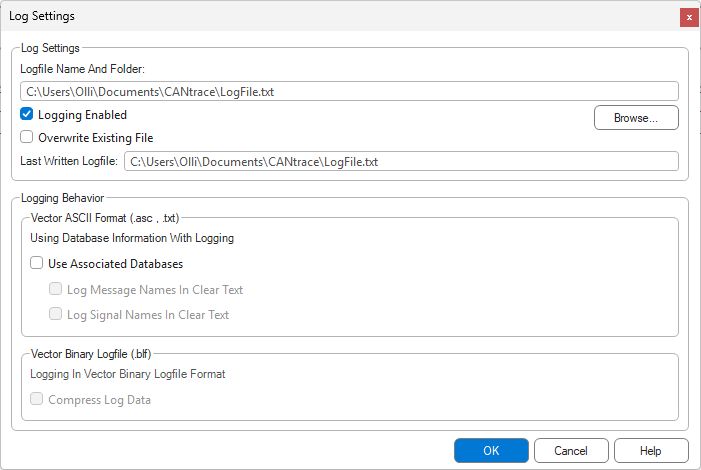
General Settings
Logfile name and folder
Select the directory and file name for logged data. The default path to store the log file is in the CANtrace folder within the Windows Documents folder.
Logging Enabled
Check this box to activate logging.
- Start/Stop: Logging begins when going on bus and ends when going off bus.
- Note: The log settings cannot be changed while on bus.
Overwrite Existing File
- Checked: If the file exists and the user goes "on bus" with logging activated, old logfile will be overwritten. Old data in the file will be lost!
- Unchecked: A new log file will be created every time going on bus.
Vector ASCII Specific Settings
- Use Associated databases: Check this to add interpretted message data to logfile as comments if available in dbc.
- Log message names in clear text: Writes the name of the CAN message as a comment in the log file.
- Log signal names in clear text: Writes the signal name as a comment and logs the signal value in physical format (applying factor and offset).
Vector BLF Specific Settings
- Compress log data: When checked, compression is applied to the logged data to significantly decrease the resulting file size.
Database Log Settings
Database Log Settings is used for setting up your database logging behavior. Access Database Log Settings from the menu bar by selecting Logging > DBC Log Settings.
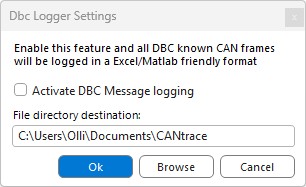
Activate DBC Message logging
Check this box if you want to activate the DBC logging; otherwise, uncheck the box to deactivate DBC logging.
- Start/Stop: Logging begins when going on bus and ends when going off bus.
- Note: The log settings cannot be changed while on bus.
File directory destination
Here you can see the selected directory where the DBC log files will be stored. Click Browse to select the destination folder.
A full description of the log file format can be found here.