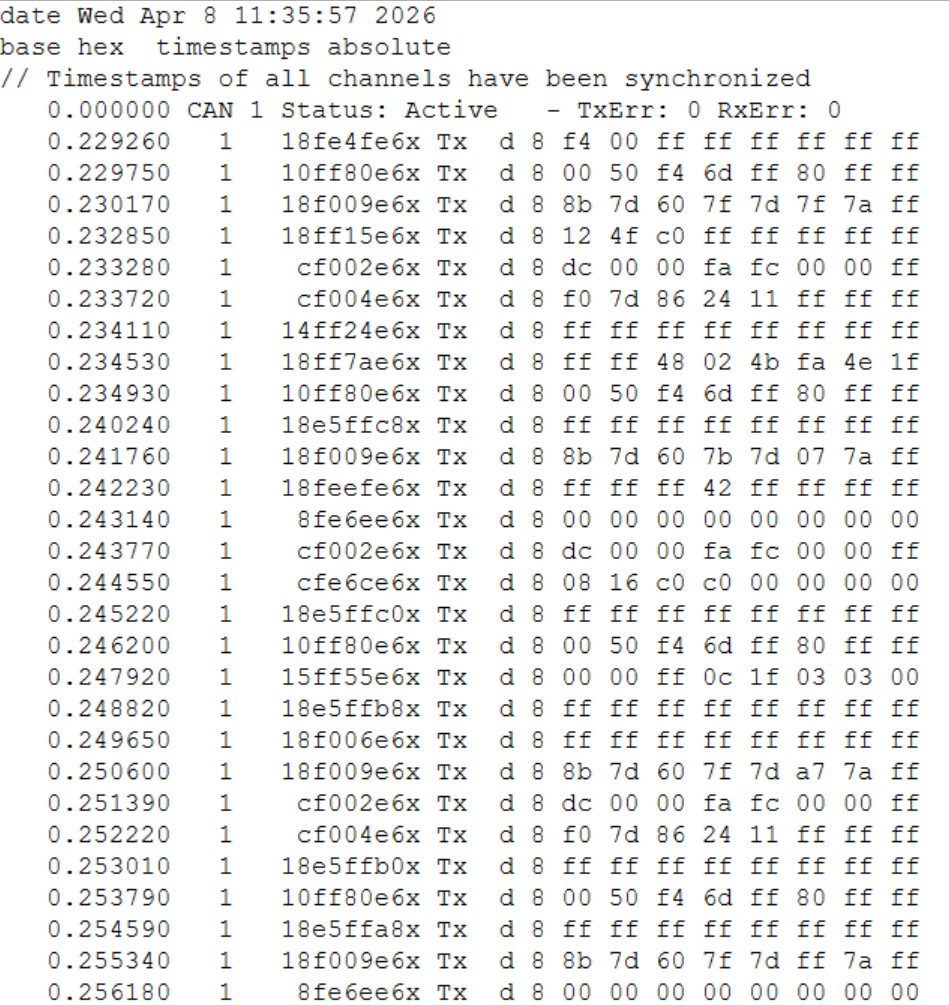
Vector ASCII Log File
- Format: Logged in hexadecimal.
- Timestamp: Contains 6 digits.
- Data Limits: CAN messages up to 8 bytes are logged. Messages larger than 8 bytes (e.g., J1939 transport layer frames) are discarded as assembled units; only the individual 8-byte frames are logged. CANtrace re-assembles and displays the long frame during playback.
Status and Comments
CAN Interface Chip Status / Error information:
<Timestamp> CAN <Channel> Status : <Chip status> - TxErr : <Number of transmit errors> RxErr : <Number of receive errors>
Comments:
// <Comment>
Classical CAN Events on Classical CAN Channel
- Standard CAN Identifier:
<Timestamp> <Channel> <ID> <Direction> d <dlc (0 to 8)> <data 0> <data 1> ... <data 7> - Extended CAN Identifier:
<Timestamp> <Channel> <ID>x <Direction> d <dlc (0 to 8)> <data 0> <data 1> ... <data 7> - CAN Error Frame:
<Timestamp> <Channel> Error Frame ECC : <ECC code> - CAN Remote Frame:
<Timestamp> <Channel> <ID> <Direction> r
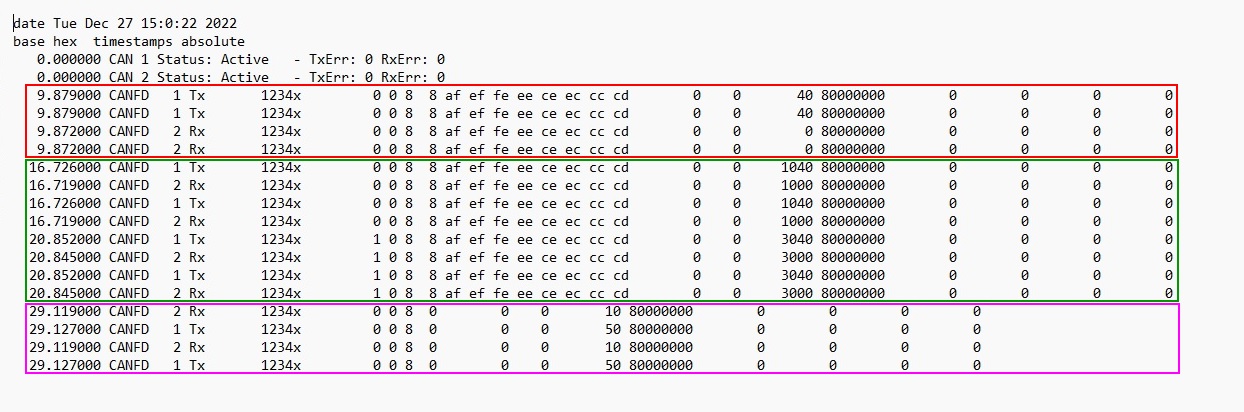
CAN FD
Note:
<SymbolicName>is not shown in the trace during playback and is not written to the log file. Fields like<MessageDuration>,<MessageLength>, and BitTiming configurations are always set to 0.
When CANtrace writes a CAN FD log file:
<SymbolicName>is not written to the log file.<MessageDuration>,<MessageLength>,<BitTimingConfArb>,<BitTimingConfData>,<BitTimingConfExtArb>and<BitTimingConfExtData>are always set to 0.- Only bits 4, 6, 12, 13 and 14 are set in
<Flags>. - Only bit 31 is set in
<CRC>.
Classical CAN Events on CAN FD Channel:
- Standard ID:
<Timestamp> CANFD <Channel> <Dir> <ID> <SymbolicName> <BRS> <ESI> <DLC(0 to 8)> <DataLength(0 to 8)> <D0>...<D7> <MessageDuration> <MessageLength> <Flags> <CRC> <BitTimingConfArb> <BitTimingConfData> <BitTimingConfExtArb> <BitTimingConfExtData> - Extended ID (in red):
<Timestamp> CANFD <Channel> <Dir> <ID> x <SymbolicName> <BRS> <ESI> <DLC(0 to 8)> <DataLength(0 to 8)> <D0>...<D7> ... - Remote Frame (in magenta):
<Timestamp> CANFD <Channel> <Dir> <ID> x <SymbolicName> <BRS> <ESI> <DLC(0 to 8)> <DataLength(0)> ...
CAN FD Events (Bit 12 set in <Flags>):
- Standard ID:
<Timestamp> CANFD <Channel> <Dir> <ID> <SymbolicName> <BRS> <ESI> <DLC(0 to F)> <DataLength(0 > to 8, 12, 16, 20, 24, 32, 48 or 64)> <D0> <D1>... <D63> <MessageDuration> <MessageLength> <Flags> <CRC> <BitTimingConfArb> <BitTimingConfData> <BitTimingConfExtArb> <BitTimingConfExtData> - Extended ID (in green):
<Timestamp> CANFD <Channel> <Dir> <ID> x <SymbolicName> <BRS> <ESI> <DLC(0 to F)> <DataLength(0 > to 8, 12, 16, 20, 24, 32, 48 or 64)> <D0> <D1> ... - Error Frame:
<Time> CANFD <Channel> <Dir> <ErrorFrame> <ErrorText> <flags> <code> <codeExt> <Phase> <Position> <ID> <BRS> <ESI> <DLC> <DataLength> <MessageDuration> <extFlags> <CRC> <BitTimingConfArb> <BitTimingConfData> <BitTimingConfExtArb> <BitTimingConfExtData>