Peak Settings
CAN Settings is used to set up your CAN interface.
Add a new CAN interface by clicking the UnAssigned device in the left-side window, then selecting your CAN interface from the Hardware drop-down box.
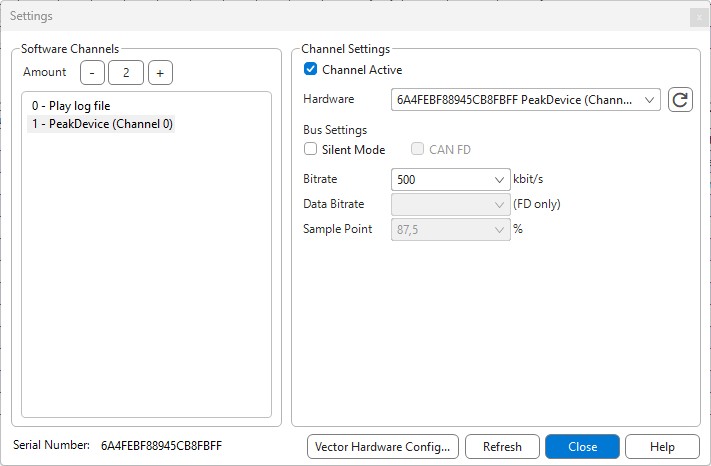
The serial number used to generate the license for the Peak interface can be found in the lower-left corner of the dialogue box.
Configurable Settings
Software channel
You may define which Software Channel you assign the CAN interface to. Channels are used to manage multiple interfaces.
Channel Active
Un-checking Channel Active disables the channel, in case you do not want this CAN interface to participate in the bus communication, but want to preserve the settings for future use.
Silent mode
Configure the CAN interface to work in silent mode (won't transmit anything, won't set the ACK bit of the received messages) if the CAN interface supports silent mode.
Bitrate
Select the baudrate for the CAN interface. The supported baudrates for Peak CAN interfaces are:
Classical CAN Configuration
| Supported Baudrate |
|---|
| 1 Mbit/s |
| 800 kbit/s |
| 500 kbit/s |
| 250 kbit/s |
| 125 kbit/s |
| 100 kbit/s |
| 83,3 kbit/s |
| 50 kbit/s |
| 20 kbit/s |
| 10 kbit/s |
| 5 kbit/s |
Sampling point
Due to hardware limitations of Peak devices, the sampling point cannot be adjusted.