TKE J1939 Database
A J1939 database file is bundled with CANtrace starting from version 3.15 and can be found in the CANtrace folder under the Public Documents folder in Windows.
- Default Path (Windows 11):
\%PUBLIC%\Documents\CANtrace\TKE_J1939.dbc
The TKE J1939 database file has been created by TKE from the SAE J1939 standard.
Source: SAE J1939™ Digital Annex of Serial Control and Communication – Heavy Duty Vehicle Network Data, December 2020.
Supported Features
The database includes nearly all standard 8-byte messages and also the most important longer messages.
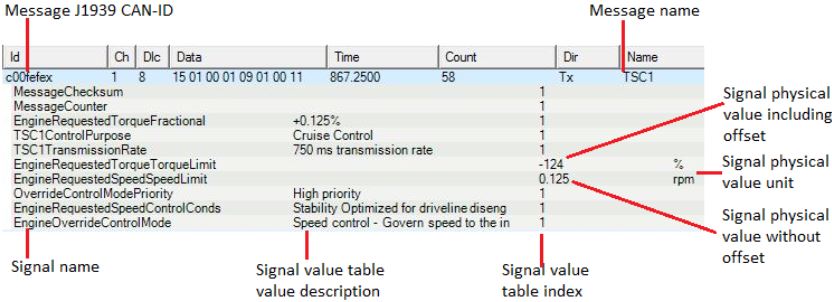
The main target for the TKE J1939 database is to facilitate the monitoring of a J1939 network using CANtrace. It is used to display message names (i.e., message acronyms from the SAE document) as well as signal names, raw values, physical values, units, value descriptions, and comments.
Technical Specifications
- PGN Notation: The database uses a type of PGN notation that allows CANtrace to interpret messages based only on the PGN, without considering source and destination addresses. This is achieved by setting the source address of all messages (PDU1 and PDU2) and the destination address of PDU1 messages to the null address value
0xFE. - Priority Masking: When used with CANtrace, the priority bits of the CAN ID are automatically masked. This ensures that messages match the database regardless of the priority assigned on the bus.
- DTC Decoding: The database supports the attribute
SigType=DTCto properly decode Diagnostic Trouble Codes (DTCs) in DM1 and DM2 messages. This is compatible with the Vector toolchain for database sharing. - Compatibility: Compatible with CANtrace version 3.11 and newer, Kvaser Database Editor (v2 and v3), and Vector CANdb++ Editor.
Unsupported Features
- Omitted Messages: Most messages that cannot be automatically parsed from the SAE J1939 Digital Annex have been omitted.
- Proprietary PGNs: Proprietary messages (PGNs 61184, 126720, 65280 to 65535, and 130816 to 131071) are not included to avoid conflicts with user-defined proprietary databases.
Editing the Database
Important Recommendation
Rather than editing the TKE database, we strongly recommend that you create your own database and associate it with CANtrace in addition to the TKE J1939 database as needed. CANtrace supports having multiple databases on a single channel.
TKE_J1939.dbc is installed as a read-only file. If changes are necessary:
- Copy the database and give it a new name.
- Remove the "Read-only" attribute from the new file.
- Edit your new copy.
This ensures your changes are not lost, as the original database will be replaced during software updates or reinstallation.